
Setapp AI Swift SDK
This guide will help you integrate Setapp AI capabilities into your iOS or macOS app.
Core сoncepts & сapabilities
The Setapp AI Swift SDK provides the following capabilities through the Responses API:
- Model discovery: List available AI models from multiple providers.
- Text streaming: Real-time streaming responses via Server-Sent Events.
- Conversation context: Maintain multi-turn conversations with context continuity.
- Structured outputs: Generate JSON-formatted responses with schema validation.
- Function calling: Enable models to call defined functions/tools.
- Reasoning models: Support for models with enhanced reasoning capabilities.
- Image generation and editing: Create or edit images from text prompts; supports PNG, JPEG, and WebP output formats. Note: image streaming is not supported.
- Audio transcription: Transcribe audio files to text with multiple output formats (plain text, JSON, SRT/VTT subtitles).
- Video generation: Generate video clips from text prompts; supports polling job status and downloading the completed video and thumbnail.
- Credit balance: Check the user's available AI credits.
Each model exposes its supported capabilities through the capabilities property, allowing you to check feature support before use.
Setup
1. Configure authentication
The Setapp AI Swift SDK handles user authentication automatically through Setapp's OAuth system with the ai.openai scope. To enable this, you need to configure the SDK with your OAuth client credentials obtained from your developer account:
import Setapp
import SetappAI

SetappManager.shared.ai.set(configuration: .init(
    authConfiguration: AuthConfiguration(
        oauthClientId: "your-oauth-client-id",
        oauthSecret: "your-oauth-secret"
    )
))
2. Access the AI API
The AI functionality is accessed through the SetappManager.shared.ai instance:
let ai = SetappManager.shared.aiBasic usage
The examples below demonstrate common usage patterns of the Responses API.
Fetch available models
Retrieve the list of AI models available to your users:
let models = try await ai.models.list()

// Each model contains:
// - id: Unique identifier (e.g., "gpt-4o", "claude-3-opus")
// - mode: Operational mode (e.g., .chat, .embedding)
// - capabilities: Supported features (e.g., .vision, .functionCalling)
Сreate a streaming response
Create a streaming conversation with an AI model:
// Select a model from the list
let model = selectedModel // From models.list()

// Create a streaming request
let stream = try await SetappManager.shared.ai.responses.createStream(
    model: model,
    input: [.message("Hello, how are you?")]
)

// Process streaming events
// Note: If a streaming error occurs, it throws and terminates the stream
for try await event in stream {
    if case let .response(.outputText(.delta(delta))) = event {
        // Handle text delta (incremental response)
        let text = delta.delta
    }
}
Maintain conversation context
To maintain conversation context across multiple messages, use the previousResponseID parameter:
var conversationResponseId: String?

// First message
let stream1 = try await ai.responses.createStream(
    model: model,
    input: [.message("What is Swift?")],
    previousResponseID: nil,
    store: true
)

for try await event in stream1 {
    if case let .response(.responseLifecycle(.completed(lifecycleEvent))) = event {
        conversationResponseId = lifecycleEvent.response.id
    }
}

// Follow-up message (maintains context)
let stream2 = try await ai.responses.createStream(
    model: model,
    input: [.message("Can you give an example?")],
    previousResponseID: conversationResponseId,
    store: true
)
Provide input
The API supports various input types through the Input enum:
// Simple text message (automatically creates a user message)
let input1: SetappAIAPI.Responses.Input = .message("Your message here")

// String literal (shorthand for .message())
let input2: [SetappAIAPI.Responses.Input] = ["Your message here"]

// Custom message with role
let input3: SetappAIAPI.Responses.Input = .message(
    SetappAIAPI.Responses.Input.Message(
        content: [.text(.init("Your message"))],
        role: .user
    )
)
Image generation and editing
This section covers how to generate and edit images using AI models.
Generate an image
Create images from text descriptions:
// Select a model with image generation capability
let model = selectedModel // From models.list() with mode: .imageGeneration

// Create image generation parameters
let parameters = SetappAIAPI.Images.Generation.Parameters(
    model: model,
    prompt: "A serene landscape with mountains and a lake at sunset",
    size: .size1024x1024,
    quality: .high,
    outputFormat: .png,
    n: 1
)

// Generate the image
let response = try await ai.images.generation(
    parameters: parameters,
    timeoutInterval: 60
)

// Access the generated image
if let imageData = response.data?.first?.data {
    // Use the image data (Data type)
    let image = UIImage(data: imageData)
}
Edit an existing image
Modify or extend existing images using text prompts:
// Prepare input image
let inputImage = SetappAIAPI.Images.Edit.InputImage(
    image: originalImageData,
    imageType: .png
)

// Create edit parameters
let parameters = SetappAIAPI.Images.Edit.Parameters(
    model: model,
    prompt: "Add a rainbow in the sky",
    image: [inputImage],
    size: .size1024x1024,
    quality: .high,
    outputFormat: .png,
    n: 1
)

// Edit the image
let response = try await ai.images.edit(
    parameters: parameters,
    timeoutInterval: 60
)

// Access the edited image
if let imageData = response.data?.first?.data {
    let editedImage = UIImage(data: imageData)
}Note: Image streaming (the ability to receive partial image data progressively) is not supported.
Audio API
The Audio API allows you to transcribe audio files into text.
Transcribe audio
// Load audio file data
let audioData = try Data(contentsOf: audioFileURL)

// Create transcription parameters
let parameters = SetappAIAPI.Audio.Transcription.Parameters(
    file: audioData,
    fileType: .mp3,
    model: "openai/whisper-1"
)

// Transcribe to JSON
let response = try await ai.audio.transcribe(
    parameters: parameters,
    timeoutInterval: 120
)
let transcribedText = response.text

// Or transcribe to plain text
let text = try await ai.audio.transcribeText(
    parameters: parameters,
    timeoutInterval: 120
)

// Or get verbose JSON
let verboseResponse = try await ai.audio.transcribeVerbose(
    parameters: parameters,
    timeoutInterval: 120
)
let segments = verboseResponse.segments
let words = verboseResponse.words

// Or generate subtitles
let srt = try await ai.audio.transcribeSRT(parameters: parameters, timeoutInterval: 120)
let vtt = try await ai.audio.transcribeVTT(parameters: parameters, timeoutInterval: 120)

// Or get diarized segments with speaker labels
let diarizedResponse = try await ai.audio.transcribeDiarized(
    parameters: parameters,
    timeoutInterval: 120
)
Video API
The Video API generates video clips from text prompts. Video generation is asynchronous: the initial call creates a job and returns immediately. You then poll the job status until it completes, then download the video file.
Generate a video
Submit a video generation job:
// Select a model with video generation capability
let model = selectedModel // From models.list() with mode: .videoGeneration

// Create video generation parameters
let parameters = SetappAIAPI.Videos.Generation.Parameters(
    model: model,
    prompt: "A calico cat playing a piano on a concert stage",
    seconds: .four,
    size: .portrait720x1280
)

// Submit the job (returns immediately with status: .queued)
let job = try await ai.videos.generate(
    parameters: parameters,
    timeoutInterval: 60
)Note: Video generation can take from a few seconds to several minutes depending on the model and clip duration.
Poll job status
Video generation takes time. Poll retrieve until status is .completed or .failed:
var status = job.status
var videoID = job.id

while status != .completed && status != .failed {
    try await Task.sleep(for: .seconds(5))

    let updated = try await ai.videos.retrieve(
        videoID: videoID,
        timeoutInterval: 30
    )
    status = updated.status
}

if status == .failed {
    // Inspect updated.error for details
}
Download video content
Once the job status is .completed, download the video or a thumbnail:
// Download the MP4 video file
let videoData = try await ai.videos.content(
    videoID: videoID,
    variant: .video,
    timeoutInterval: 300
)

// Save or display the video
try videoData.write(to: destinationURL)

// Or download a thumbnail image
let thumbnailData = try await ai.videos.content(
    videoID: videoID,
    variant: .thumbnail,
    timeoutInterval: 60
)
Credit balance
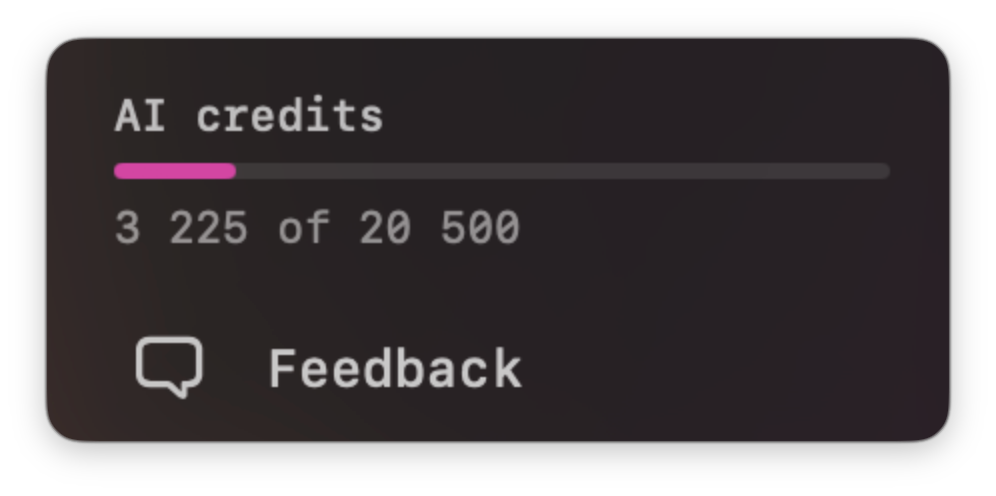
The Credit balance API lets you check the user’s available AI credit balance. You can use it to display the user’s current balance in your app, so that users know when they need to purchase more credits.
Check balance
let balances = try await ai.credits.balances()

// Aggregated totals
let available = balances.totalAvailable.amount
let initial = balances.totalInitialAmount.amount

// Individual balances
for balance in balances.balances {
    // balance.id — unique identifier
    // balance.type — e.g. .subscription
    // balance.currentValue.amount — remaining credits
    // balance.initialValue.amount — starting credits
}
Get more credits
To direct users to the purchase page, use one of these options:
Links API
Use the Links API to get the current purchase URL.
Setapp AI Swift SDK
Use this code to get the current purchase URL:
let url = try await ai.links.purchaseURL()Error handling
Automatic error presentation (default)
By default, the Setapp AI Swift SDK uses .autoPresent mode, which automatically presents errors to users via UI with appropriate recovery options. You don't need to explicitly handle errors in this mode.
Manual error handling
If you need custom error handling, configure the SDK to propagate errors by setting mode: .propagate:
SetappManager.shared.ai.set(configuration: .init(
    authConfiguration: AuthConfiguration(
        oauthClientId: "your-oauth-client-id",
        oauthSecret: "your-oauth-secret"
    ),
    mode: .propagate  // Override default .autoPresent
))
Then catch and handle SetappAIError in your code:
do {
    let models = try await ai.models.list()
    // Handle success
} catch let error as SetappAIError {
    switch error.code {
    case .insufficientCredits:
        // Handle insufficient credits
        if let recoveryURL = error.recoveryURL {
            // Direct user to purchase credits
        }
    case .rateLimit:
        // Handle rate limit
    case .modelNotAllowed:
        // Handle model access issue
    case .general:
        // Handle general error
    }
} catch {
    // Handle other errors
}
Setapp AI error codes
.general— General or unknown error.rateLimit— Rate limit exceeded.insufficientCredits— User needs to purchase more credits.modelNotAllowed— Model not available or not allowed for this user
Handling stream cancellation
For streaming operations, you can handle cancellation:
let task = Task {
    do {
        let stream = try await ai.responses.createStream(...)
        for try await event in stream {
            guard !Task.isCancelled else {
                break
            }
            // Process event
        }
    } catch is CancellationError {
        // Handle cancellation
    } catch {
        // Handle other errors
    }
}

// Cancel the stream when needed
task.cancel()let task = Task {
do {
let stream = try await ai.responses.createStream(...)
for try await event in stream {
guard !Task.isCancelled else {
break
}
// Process event
}
} catch is CancellationError {
// Handle cancellation
} catch {
// Handle other errors
}
}
// Cancel the stream when needed
task.cancel()Updated 24 days ago